





 ERP App Marketplace
3D Model Visualizer for Acumatica
Stop guessing what you're building. See it in 3D.
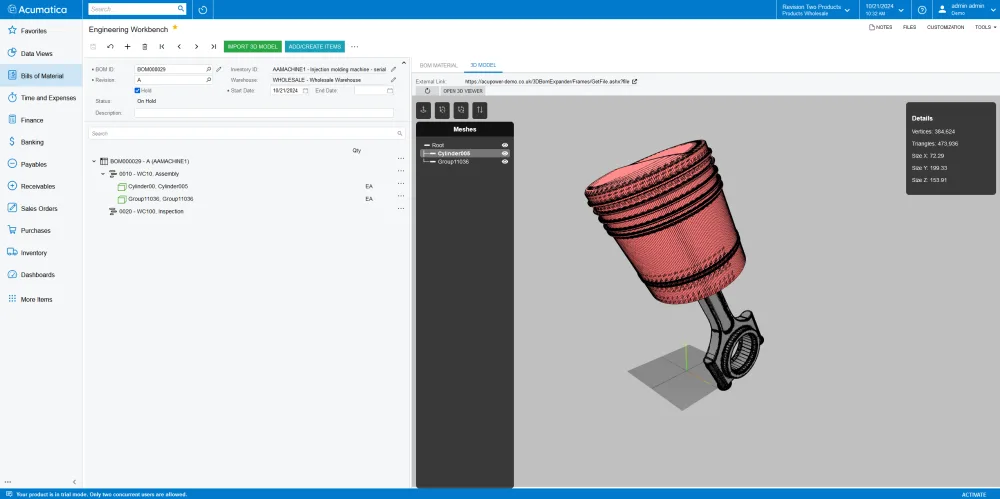
3D Model Visualizer for Acumatica brings your engineering designs directly into the Acumatica Engineering Workbench, so your team can view, inspect, and build Bills of Materials with full visual clarity, without switching to a separate application.
Import your 3D design files, click on individual parts, toggle components on and off, and zoom into exact details — all from within your Acumatica instance. When you can see every layer of an assembly, errors get caught earlier, BOM creation gets faster, and planning becomes significantly more precise.
Key Features
- Import 3D models directly into Acumatica Engineering Workbench
- View full interactive 3D models within your Acumatica instance
- Click on individual parts to identify components and materials
- Toggle component visibility to expose hidden or internal parts
- Zoom in for detailed inspection of any assembly section
- Link visual parts to BOM items and project tasks
- Native SolidWorks integration (CAD and 3D Max coming soon)
- No third-party visualization software required
Who Is This For?
Built for engineers, production planners, and manufacturing operations teams using Acumatica who need to work with complex assemblies. If your team creates and manages Bills of Materials, this tool reduces the back-and-forth between design software and ERP, and virtually eliminates the risk of building a BOM from memory or flat files.
Coming Soon
Seamless integrations with CAD and 3D Max are actively in development, with the long-term goal of fully automating BOM creation directly from imported design files.
Explore Similar apps